Environment: Playwright 1.62, bundled headless Chromium, Linux. The cover this came out of went to print in 2026.
Last time the point was that a measurement can be confidently wrong in a way that a glance at the page cannot. Here is the shortest example of that we have, and it cost a print proof.
Book covers here are HTML too. Not the interior — that goes through WeasyPrint — but the wrap: back cover, spine, front cover, one sheet, printed and folded. It is a drawing rather than a document, so a browser is the reasonable tool, and Playwright drives it.
The symptom
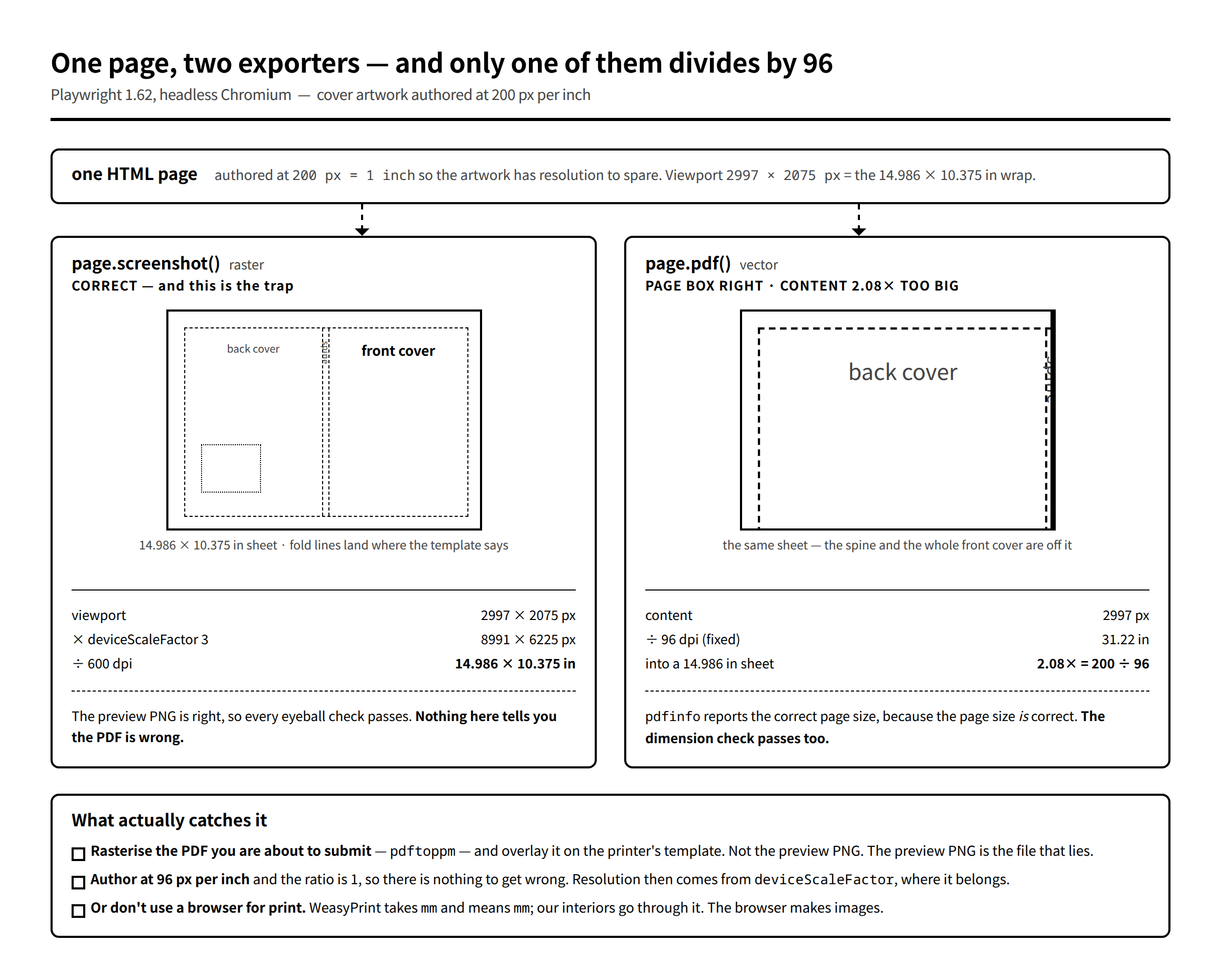
We uploaded a wrap cover PDF. The printer’s preview came back with the right-hand side cut off — the front cover pushed off the sheet.
Everything we had checked said the file was fine:
- The preview PNG, rendered from the same HTML in the same script, was correct. Fold lines on the fold lines, barcode clear of the keep-out area.
- The PDF’s page size was correct:
pdfinforeported exactly the trim we had asked for.
A file with the right page size, generated from a page that we could see was right. And it was wrong.
Advertisement
The arithmetic
page.pdf() converts CSS pixels to physical length at 96 dpi, always. One CSS px is 1/96 inch, per the CSS spec, and Chromium’s print path takes that literally.
Our cover HTML is authored at 200 px per inch. Not for any deep reason — the artwork has curves and hairlines in it, and working at 200 units per inch means you can position things at a useful resolution without fractional pixels everywhere:
const PPU = 200;                 // px per inch for authoring; DSF=3 -> 600dpi output
const IN = v => +(v * PPU).toFixed(2);
const WRAP_W_IN = 14.98611, WRAP_H_IN = 10.375, BLEED = 0.125;
So the page is 2997 px wide, meaning 14.986 inches. page.pdf() reads 2997 px as 2997 ÷ 96 = 31.22 inches and lays that out on a 14.986-inch sheet. Everything past the halfway mark falls off the right edge.
The ratio is 200 ÷ 96 = 2.083. If you have ever had a browser-generated PDF come out "consistently about a third too big", that is the same bug with the units the other way round: authoring at 72 px per inch, as if CSS px were PDF points, gives 96 ÷ 72 = 1.333.
Why nothing caught it
This is the part worth keeping, because the bug itself is one number.
page.screenshot() is correct. It emits actual CSS pixels; deviceScaleFactor multiplies them. There is no dpi conversion anywhere in that path, so the preview PNG is right no matter what unit you authored in. Every visual check you do — and a cover is nothing but visual checks — passes.
The page box is correct too. width and height set the paper size directly. So the one automated check you would think to write, "is the PDF the size I asked for", passes as well.
Two independent verifications, both green, one for each half of the file: the right sheet, the wrong content on it. The only artefact that shows the problem is the PDF itself, and the PDF is the one thing nobody looks at directly — you look at the preview, because it is a PNG and it opens instantly.
That is now a rule here: rasterise the file you are actually submitting. pdftoppm the PDF, overlay the result on the printer’s template, and look at that image. Not the preview PNG rendered from the same source — a different artefact from a different code path, which is exactly why it can agree with your intentions while the shipped file disagrees.
Fixes, in order of how much you should like them
Author at 96 px per inch. The ratio becomes 1 and there is nothing left to get wrong. Output resolution comes from deviceScaleFactor, which is where it should have come from in the first place. This is the right answer for a new script.
Pass scale. page.pdf() takes a scale option, accepting 0.1 to 2.0. For our 200-per-inch page that is 96/200 = 0.48, comfortably in range. It works, and it leaves a magic number in the code whose meaning is "we authored in the wrong unit" — fine as a patch, poor as a design.
Don’t use the browser for print at all. For anything that is a document rather than a drawing, WeasyPrint takes mm and means mm. Our interiors go through it and this class of bug does not exist there.
What we actually ship for covers is a fourth thing, because by the time we found this we already had a 600 dpi raster we had verified against the template:
// deviceScaleFactor=3, viewport=IN(=200ppu) -> 出力 px = inches*600 (600dpi)
const DSF = 3;
const pg = await browser.newPage({
  viewport: { width: Math.round(IN(WRAP_W_IN)), height: Math.round(IN(WRAP_H_IN)) },
  deviceScaleFactor: DSF,
});
await pg.screenshot({ path: PNG, type: 'png',
                      clip: { x: 0, y: 0, width: IN(WRAP_W_IN), height: IN(WRAP_H_IN) } });
from PIL import Image
im = Image.open(PNG).convert("RGB")
im.save(PDF, "PDF", resolution=600.0)Pillow writes the PDF, and resolution=600.0 is the whole conversion: 8991 px ÷ 600 = 14.986 inches. The PDF is a flattened image, which print-on-demand services accept for covers, and the file we verified is byte-for-byte the file we submit — no second rendering path to disagree with the first.
For an interior full of text you would not want this. For a cover it removes a step rather than adding one.
The general point
Two exporters, one source, silently different unit conventions. Nothing in either API’s shape tells you they disagree; screenshot and pdf sit next to each other in the docs and read like two output formats of the same thing.
Whenever a pipeline has a preview path and a delivery path, the preview is not evidence about the delivery. It is evidence about the preview. Check the artefact you are shipping — the actual bytes, opened as the recipient will open them.
Next: generating Kindle-ready Word files with docx-js, and the two things that made us rebuild — a bookmark id collision that quietly breaks every internal link, and the fact that you cannot use a table anywhere.