Environment: WeasyPrint (system Python 3, not the venv), CSS Paged Media, B5 trim. The interiors described here went to print in July 2026.
Our book manuscripts are Markdown in a git repository. The print interior has to be a PDF that a print-on-demand service will accept — correct trim size, correct gutter for the page count, no content in the margins, fonts embedded.
Between those two things we put HTML and CSS, rendered by WeasyPrint.
The reason is not that HTML is a good typesetting language. It is that the alternative — a layout application — breaks the one property the rest of the pipeline depends on: that the book can be regenerated from source. When a check finds a problem in chapter 6, the fix goes into the Markdown and the PDF is rebuilt. A hand-adjusted layout file makes that a manual re-import every time.
The box you are printing into
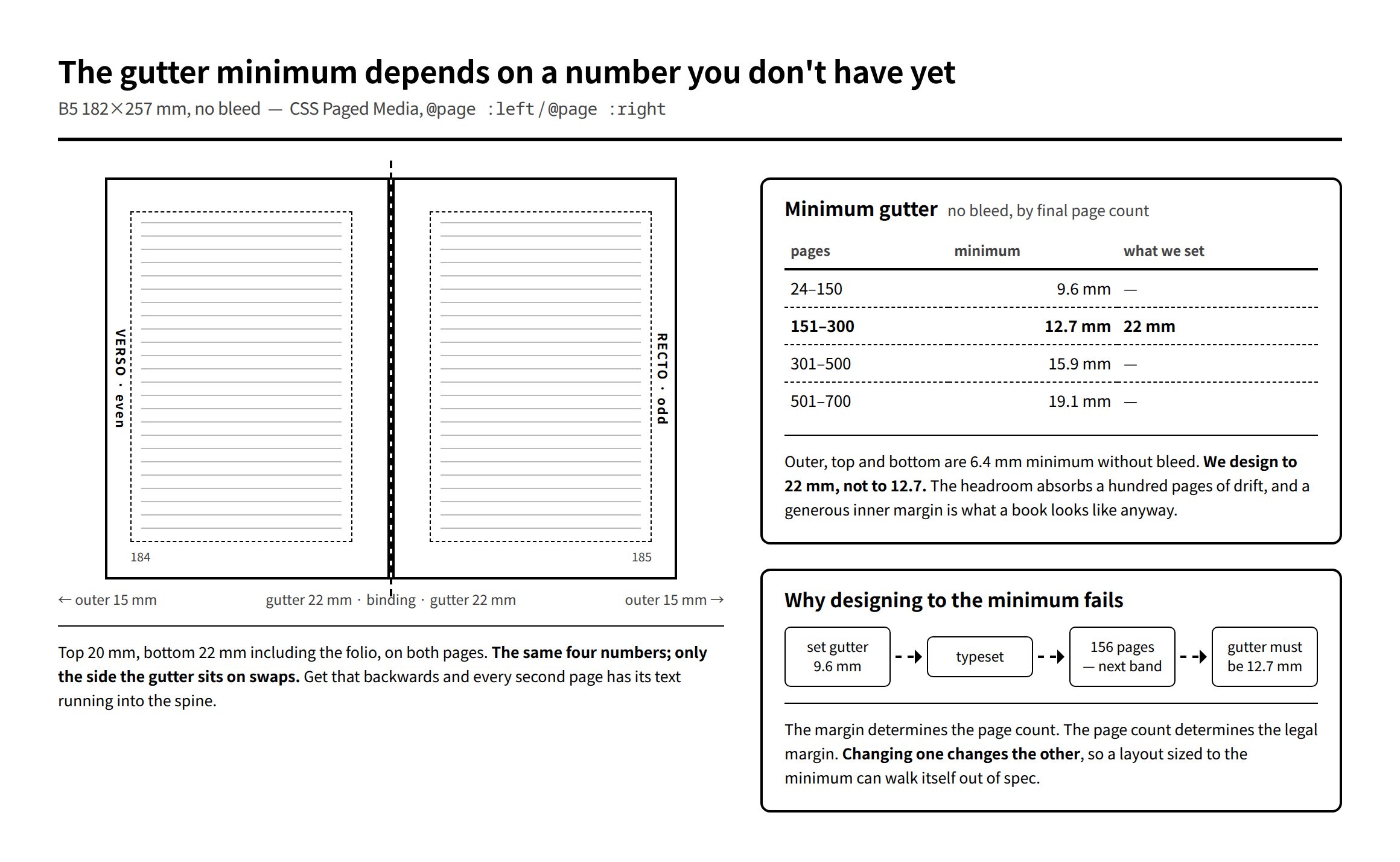
Print-on-demand margin rules are specific and non-negotiable. The interesting one is the gutter — the inner margin, swallowed by the binding — because it scales with how thick the book is:
| Page count | Minimum gutter |
|---|---|
| 24–150 | 0.375″ = 9.6 mm |
| 151–300 | 0.5″ = 12.7 mm |
| 301–500 | 0.625″ = 15.9 mm |
| 501–700 | 0.75″ = 19.1 mm |
Outer, top and bottom are 0.25″ = 6.4 mm minimum without bleed, 0.375″ with.
Note the circularity. The gutter you need depends on the page count; the page count is an output of the typesetting, which depends on the margins. Set 9.6 mm because you expect 140 pages, land on 156, and you are out of spec — with a fix that changes the page count again.
So don’t design to the minimum. For a B5 book expected to land in the 151–300 band we use:
| top | right | bottom | left | |
|---|---|---|---|---|
| recto — odd page | 20 | 15 outer | 22 | 22 gutter |
| verso — even page | 20 | 22 gutter | 22 | 15 outer |
Same four numbers on both; only the side the gutter sits on changes. 22 mm against a 12.7 mm minimum. The headroom absorbs a hundred pages of drift in either direction, and a generous inner margin is what a book looks like anyway.
In CSS this is @page :left and @page :right, which is the part of Paged Media that makes the whole approach viable:
@page :right { margin: 20mm 15mm 22mm 22mm; }   /* gutter on the left  */
@page :left  { margin: 20mm 22mm 22mm 15mm; }   /* gutter on the right */
Advertisement
Four things WeasyPrint will not draw
These cost days, so here they are plainly. When a rule or a shape "disappears", it is almost always one of these.
<ruby> and <rt> are not implemented. This is the expensive one, because it does not fail — it succeeds incorrectly. The ruby text flows into the body copy as if it were ordinary text. A word annotated with its reading prints as the word and the reading run together, with no error, no warning, and no visual signal that anything went wrong other than the text being wrong. We found eleven instances in one chapter, in a proof, by reading it.
The fix is to build ruby yourself:
# ★<ruby>/<rt> は使わない。WeasyPrint が ruby を実装しておらず、
#   <rt> の中身が本文にそのまま流れ込む(「訪《おとず》れた」→「訪おとずれた」)。
#   1 章の校正で11箇所、印字を確認。CSS 側で自前に組む。
s = re.sub(r'([一-鿿]+)《([^》]+)》',
           r'<span class="ruby">\1<span class="rt">\2</span></span>', s)
.ruby { position: relative; display: inline-block; }
.rt { position: absolute; left: -1.2em; right: -1.2em; top: -.6em;
font-size: .5em; text-align: center; white-space: nowrap; }position: absolute inside a flex item resolves the wrong containing block. Absolutely positioned children of flex items land somewhere else on the page, or vanish. A row of marker glyphs positioned over their parent boxes came out scattered into unrelated boxes.
Gradient backgrounds sometimes don’t paint at all. linear-gradient and repeating-linear-gradient — used, in our case, to draw a set of ruled lines as a background. All four lines silently absent.
Inline SVG inside a flex item is unstable — the same containing-block problem, and it is genuinely intermittent: one SVG rendered, another in a different flex context did not.
The safe set, all of it verified in print:
- Draw rules and shapes with
borderon the element itself. Not pseudo-elements, not absolute positioning, not gradients. - For side-by-side layout,
display: table/table-cellis markedly more robust than flex. - If you need overlay positioning, put the
position: absolutechild inside aposition: relativeparent that is not a flex item. It works correctly there.
The good half: you can measure before you commit
WeasyPrint’s render() returns the laid-out document as a box tree before writing any PDF. So layout decisions that would otherwise be guesses become measurements.
A concrete one: answer options in a drill book should be set in four columns when they fit, two when they don’t, one when they really don’t. That depends on the widest option, in the actual font, at the actual size. So render a fragment and look:
def opt_width(label, text):
    frag = (f'<div class="q"><div class="o"><span style="white-space:nowrap">'
            f'<span class="ol">{label}</span>{esc(text)}</span></div></div>')
    doc = HTML(string=f'…<div class="main">{frag}</div>…').render(
              stylesheets=[CSS(string=_css, base_url=str(HERE))])
    w = []
    def walk(b):
        if type(b).__name__ == "InlineBlockBox":
            w.append(b.margin_width() * PX2PT)
        for ch in getattr(b, "children", []):
            walk(ch)
    for p in doc.pages:
        walk(p._page_box)
    return max(w) if w else 0.0

def cols_for(opts):
    mx = max(opt_width(f"{i+1}.", t) for i, t in enumerate(opts))
    for c in (4, 2, 1):
        if c * (mx + GAP) <= COL_W:
            return c
    return 1
Results are cached, because rendering a fragment per option is not free, and the same option strings recur.
The three traps in reading the box tree
We hit all three, in one afternoon, and every one of them produced a number that looked completely reasonable.
Line boxes point at the same element as their block. Walk the tree naively, match on class, and a <p> with four lines gives you five hits, not one. A document containing four elements with class="d" returned forty-four boxes. Taking [0] is fine. The bug arrives the day you change [0] to sum() — a 22.8 pt heading became 35.8 pt, and the total for a page was inflated by about 13 pt. Match, then do not descend.
box.height excludes margins. Use box.margin_height(). Obvious in retrospect, invisible in a number.
The box tree is in px at 96 dpi, not points. With @page { size: 182mm } you get page.width = 687.9, not the 515.9 you would get in points. Multiply by 0.75. A layout that is "consistently 33% too big" is this and nothing else.
And one procedural trap: to measure a block’s natural height you have to remove the overflow: hidden clamp — at which point the content flows onto a second page and the box you are measuring is split across both. Measure with @page { size: … 4000mm !important } and assert len(doc.pages) == 1.
What that taught us, which was not what we expected
Every one of those was a bug in the measuring code, not the layout. And the measurements came out confident: clean floating-point numbers, no warnings, no anomalies.
On the strength of one of them we sent a chapter back to be compressed. Twice. The text was fine; the ruler was broken. The agent that had produced the original text had, each time, correctly labelled its own page estimate as an estimate — while the "real measurement" that overruled it was wrong.
The rule we had been operating on was measure, don’t eyeball. That rule is wrong, or at least badly incomplete. Both lie. A measurement can be confidently wrong in a way a glance at the page cannot, precisely because it arrives as a number. When the number and the page disagree, suspect the number first — it has more ways to be wrong.
Print the proof. Look at it. Then trust the ruler.
Next: a shorter one — the PDF export in Playwright is 96 dpi, not 72, and everything you specify in millimetres comes out 1.333× too large until you know that.