Environment: WordPress with Easy Digital Downloads (free tier), Stripe, Apache on shared hosting. Watermarking in Python with pikepdf. Live since mid-2026.
Most of what we publish goes to a marketplace. Some things don’t fit there — material that has to be reprinted when an exam cycle turns, bundles with audio, worksheets meant to be printed at home — so those are sold directly, from our own WordPress with Easy Digital Downloads.
The store part was straightforward. What was not straightforward, and what this post is about, is that almost every problem we hit looked correct on the settings screen.
"It’s in the protected folder" proves nothing
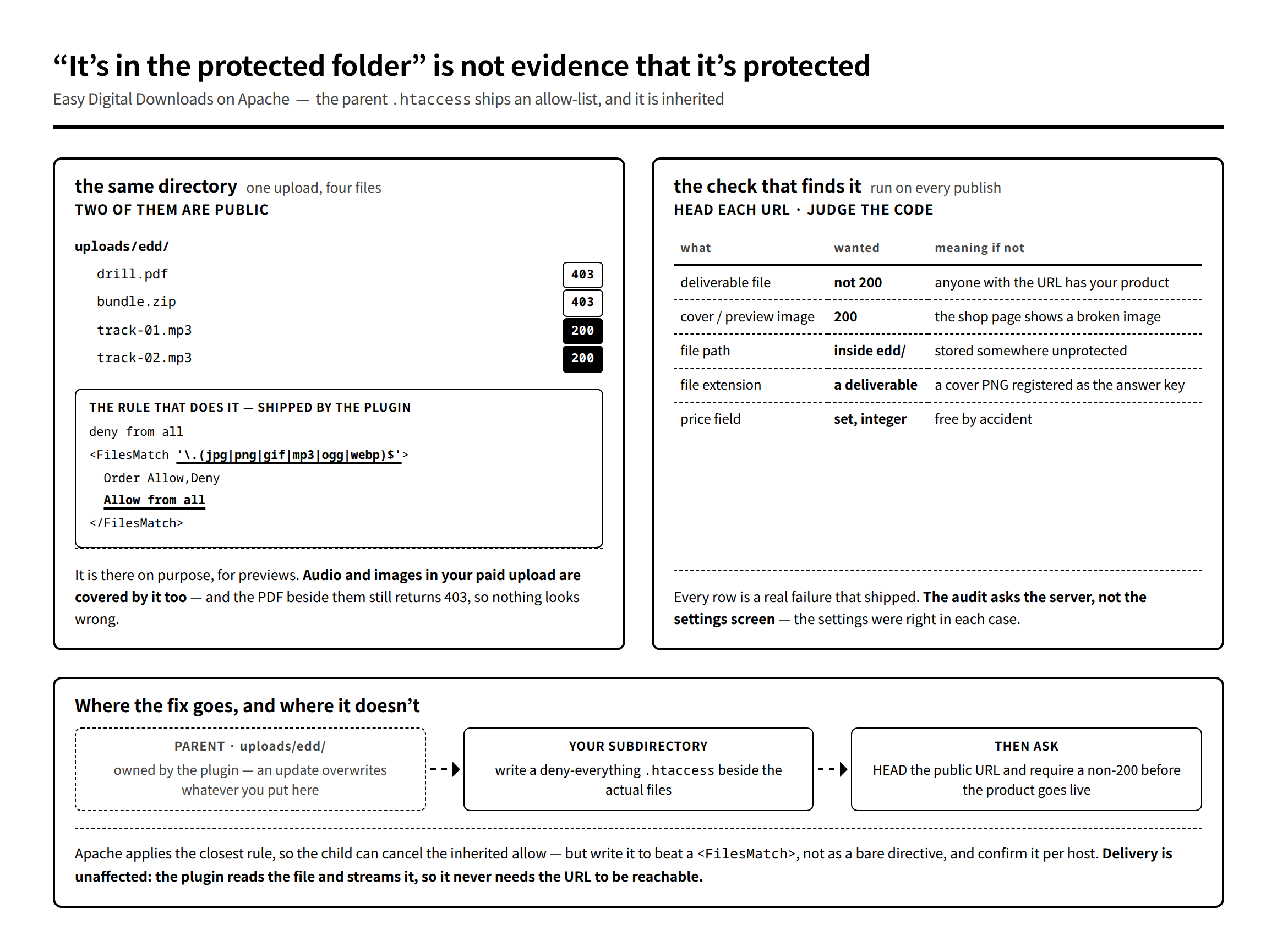
EDD puts your deliverables in a directory it protects with an .htaccess. Reasonable. So we registered four audio tracks as part of a paid product and moved on.
They were downloadable by anyone with the URL. HTTP 200, no purchase, no session.
The reason is in the .htaccess the plugin ships, which denies everything and then carves out an exception:
deny from all
<FilesMatch '\.(jpg|jpeg|png|gif|mp3|ogg|webp)$'>
Order Allow,Deny
Allow from all
</FilesMatch>
That exception is deliberate — it exists so preview images work. It also covers every image and every audio file in your paid uploads, and it is inherited by subdirectories.
What makes this genuinely hard to see: the PDFs in the same directory correctly returned 403. So the folder looked protected, because most of it was. Only the file types on that allow-list leaked, and they were the ones we had added most recently.
The fix is a deny-everything .htaccess in the subdirectory where the files actually live — not in the parent, which the plugin owns and will rewrite on update:
function harden_dir($dir) {
	$file  = trailingslashit($dir) . '.htaccess';
	$rules = "# Block direct links to paid files (parent EDD rules allow mp3/images)\n"
		. "Options -Indexes\n"
		. "<IfModule mod_authz_core.c>\nRequire all denied\n</IfModule>\n"
		. "<IfModule !mod_authz_core.c>\nOrder Allow,Deny\nDeny from all\n</IfModule>\n";
	if (!file_exists($file) || file_get_contents($file) !== $rules) {
		@file_put_contents($file, $rules);
	}
	return $file;
}
Two notes on that. Apache applies the closest matching rule, so a child directory can cancel an inherited allow — but a bare Deny from all in the child does not reliably beat a parent’s <FilesMatch> block; on one of our hosts the child rule had to be wrapped in a <FilesMatch ".*"> of its own to win. Confirm it per host rather than assuming. And blocking the URL does not break delivery: with the default direct method, the plugin reads the file from disk and streams it, so the file never has to be reachable over HTTP.
Advertisement
Check the response, not the setting
The lesson generalises past this one bug, and it is the reason there is now an audit script that runs before anything goes live. It does not read settings. It performs a HEAD request against the public URL of every registered file and judges the status code:
// (2026-07-23 実測:音声4本が HTTP 200 で公開されていた)
$res = wp_remote_head($url, array('timeout' => 10, 'redirection' => 0));
...
if ($code === 200) {
	$add('NG', '#' . $k . ' 直リンクで誰でもダウンロードできる(HTTP 200): ' . $base);
}
And the inverse, which is a different bug with the same cause — display images placed in the protected directory are always 403, so the shop page shows a broken image:
// 表示用画像は配布物とは逆で、叩いて 200 が返らなければ壊れている。The rest of the checks came from real incidents rather than imagination: the price field unset or non-integer, no file registered at all, a file whose extension is not a deliverable — that one is from a cover PNG that got registered under the label "answer key", which nobody notices until a customer opens it — and a file recorded in the database that no longer exists on disk.
Every one of those passed a visual review of the product screen. Ask the server.
Expiry, download limits, and the numbers on your legal pages
Download links expire, and each order has a limited number of downloads per file. Both are settings, and both leak into places that are not settings.
- The receipt page regenerates its links every time it is opened. So an expired link in an email is not a support ticket — the buyer can resolve it themselves. Saying so explicitly in the purchase email removed nearly all of that traffic.
- "Resend receipt" does not reset the download count. The thing that does is "regenerate download links" on the order, and what it does is add exactly one to that order’s limit. Not unlimited, not a reset. If you plan to be generous with a customer, know that you are being generous one download at a time.
- The numbers appear on your terms pages too. Ours are stated in the commercial-transactions notice and the terms of use. Change the setting without changing those pages and your published terms are now false. Treat them as one edit.
Audit the defaults you never chose
One more, and it is the one I would check first in someone else’s store.
Purchases silently required a customer account. Not a decision anyone made — a default left over from installation. The check that enforces it runs before the cart total is considered, so even a free product demanded a sign-up, which is precisely the product whose job is to have no friction.
Three settings exist: accounts required, guest checkout allowed, or an account created automatically without showing a registration form. We use the third. But the point is not which one is right; it is that nobody had ever looked, and the symptom was invisible to us because we were always logged in while testing.
Log out. Buy your own product. Buy the free one too.
Watermarking, and being honest about what it does
Every deliverable is stamped before it is uploaded: a low-opacity diagonal tile with our name across each page, a one-line copyright footer, the legal page appended at the end, and a permission profile written with pikepdf:
# 印刷=許可 / コピー=禁止 / 編集=禁止 / 注釈=許可。準拠リーダー向けの抑止一枚。
PERMS = pikepdf.Permissions(
    extract=False,           # テキスト抽出/コピー禁止
    modify_other=False,      # 内容改変禁止
    modify_assembly=False,   # ページ組替え禁止
    modify_annotation=True,  # 書き込み許可
    print_lowres=True,       # 印刷許可
    print_highres=True,
    accessibility=True,      # 読み上げ許可
)
Note what stays permitted. Printing, because these are worksheets and printing is the point. Annotation, because learners write in them. Accessibility, because turning off screen-reader access to punish copying is a bad trade.
And note what this is: a deterrent for compliant readers, not protection. Any determined person removes it in a minute. It is worth doing anyway — the same way a copyright line is worth printing — but do not let it stand in for the access controls, which are the part that actually works.
One exception in our catalogue: card products get the permission flags but no diagonal tile, because they are printed and cut out and the tile would sit across the artwork.
What you are actually trading
The economics are simpler than they look. The free tier of EDD adds a percentage on top of what the payment processor takes, and the paid tier removes it — so the break-even is just the annual licence divided by that percentage, and until you cross it the free tier is correct. That is arithmetic, not strategy.
The real trade is elsewhere: a marketplace has search inside it and your own shop does not. Nobody browses your store. Every visitor arrives from something you made — a post, a video, a link in a book — which means direct sales are not an alternative distribution channel so much as a thing you attach to an audience you already have.
What you get for that is the part we wanted: the buyer’s email address, no gatekeeper between an update and the people who bought the last version, and the ability to sell something that only makes sense for six weeks.
Next, and last in this run: moving a school-management app off a hosted development platform onto a small VPS — what we measured before moving, what broke after, and what happened to the parts of this blog that used to be about deploying on someone else’s cloud.