Environment: AivisSpeech Engine 1.2.0, Linux x64 build, running inside WSL2 on Windows. Node.js 20, Python 3, ffmpeg. Installed 2026-08-12.
We make a short Japanese podcast for learners — a couple of speakers, a few minutes an episode, twenty-odd episodes so far. It is synthesised, not recorded.
The previous post was about verifying a cloud TTS after the fact, because after the fact is the only place you can verify it. This one is about the alternative: an engine whose API hands you the pronunciation before it renders anything, which turns the entire verification problem inside out.
It runs in WSL directly
The engine ships a Linux x64 build, so it runs inside WSL with no Windows-side component:
$ ./start.sh
# → 127.0.0.1:10101   first start takes ~30 s while the BERT model loads
$ pkill -f 'aivisspeech-engine/Linux-x64/run'
That is worth stating plainly because the previous engine we used for this had no Linux build, and we ended up running it on the Windows side and talking to it through a PowerShell bridge. The bridge worked and it was a permanent, low-grade tax on everything — path translation, quoting, a process that had to be babysat from the wrong side of the filesystem boundary. Deleting it was a bigger relief than the quality difference between the two engines.
The install is 1.6 GB and lives outside the repository. The API is VOICEVOX-compatible, so porting an existing script is a URL change.
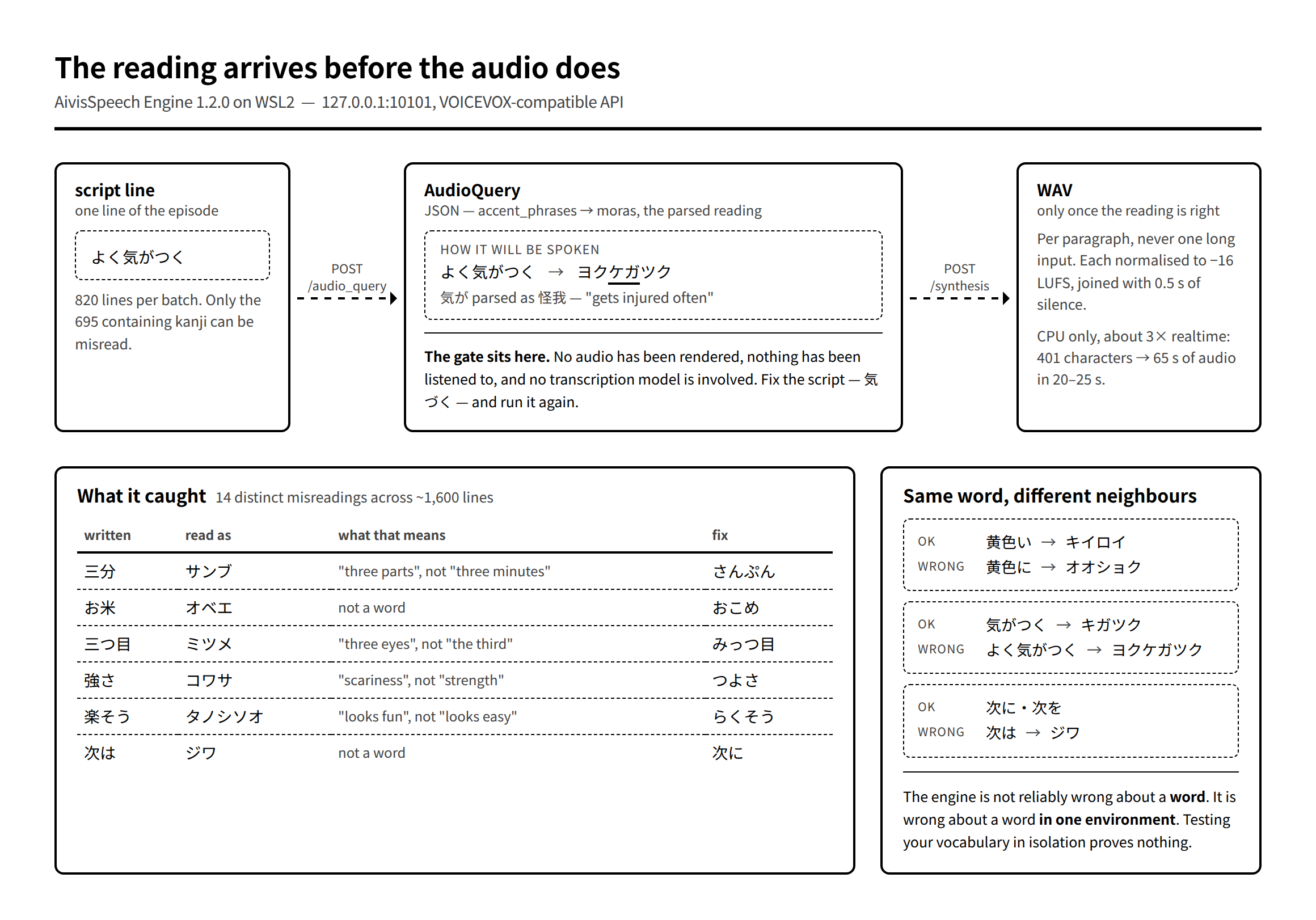
Performance on CPU, no GPU involved: roughly 3× realtime. A 401-character paragraph becomes 65 seconds of audio in 20–25 seconds of compute. 8 GB of RAM is enough. For a podcast — where you re-render the same episode a dozen times as the script changes — that is the difference between iterating freely and thinking about the bill.
One thing to do before picking a voice: check the licence and provenance of each model. The bundled ones here are ACML 1.0 — commercial use permitted, credit optional — and we don’t install models whose training data is disputed, which is a real consideration in this ecosystem.
Advertisement
The part that matters: synthesis is two calls
POST /audio_query?speaker=<id>&text=<text>   →  AudioQuery (JSON)
POST /synthesis?speaker=<id>   body: AudioQuery   →  WAV
The intermediate AudioQuery is not an opaque handle. It contains the parsed reading — accent phrases, and within them, moras:
const q = await fetch(`${API}/audio_query?speaker=${styleId}&text=${encodeURIComponent(body)}`,
                      { method: 'POST' });
const query = await q.json();
// AivisSpeech は AudioQuery の編集に制約があるため、話速など最小限だけ触る
query.speedScale = 1.0;
const s = await fetch(`${API}/synthesis?speaker=${styleId}`, {
  method: 'POST', headers: { 'Content-Type': 'application/json' }, body: JSON.stringify(query),
});
Which means you can ask "how will this line be read?" and get an answer without rendering audio, without listening, and without a transcription model in the loop.
That is a 30-line script:
"""台本の各行を audio_query に通して、読まれ方を kana で出す(焼く前の目視用)。
   speaker は誰でもよい。読みは声で変わらない。"""

def kana(text):
    url = f'{API}/audio_query?speaker={SPEAKER}&text={urllib.parse.quote(text)}'
    with urllib.request.urlopen(urllib.request.Request(url, method='POST'), timeout=30) as r:
        q = json.load(r)
    return ''.join(m['text'] for p in q['accent_phrases'] for m in p['moras'])

for path in sys.argv[1:]:
    for line in pathlib.Path(path).read_text(encoding='utf8').splitlines():
        m = re.match(r'^([AB]):\s*(.+)$', line)
        if not m: continue
        said = m[2].split('||EN||')[0].strip()
        print(f'{said}  →  {kana(said)}')
Run it over a script and you get every line paired with how it will actually be spoken. Any speaker id will do; the reading does not vary by voice.
Two practical notes. Only lines containing kanji can be misread — filtering to those took one batch from 820 lines to 695. And エイ → エエ, オウ → オオ are how long vowels are notated, not errors. Both of those cost time to learn and then save it forever.
What it actually caught
Fourteen distinct misreadings across about 1,600 lines. Nearly all of them are the same phenomenon: a spelling with more than one reading, resolved wrongly by context.
| Written | Read as | What it means | Fix |
|---|---|---|---|
| 三分, 五分 | サンブ, ゴブ | "three parts" instead of "three minutes" | spell the counter in kana |
| お米 | オベエ | not a word | おこめ |
| 三つ目 | ミツメ | "three eyes", not "the third" | みっつ目 |
| 強さ | コワサ | "scariness" instead of "strength" | つよさ |
| 楽そう | タノシソオ | "looks fun" instead of "looks easy" | らくそう |
| 黄色になる | オオショク | mis-segmented | きいろ |
| よく気がつく | ヨクケガツク | "gets injured often" | 気づく |
| 次は | ジワ | not a word | 次に |
| 同じ年 | オナジネン | "same year", not "same age" | 自分と同じ |
Look at the last few rows carefully, because they are the reason a word-level test would not have found any of this:
- 黄色い reads correctly. 黄色に does not.
- 気がつく on its own reads correctly. よく気がつく does not — the parser takes 気が as 怪我, "injury".
- 次に and 次を read correctly. 次は does not.
The engine is not consistently wrong about a word. It is wrong about a word in one environment. Testing your vocabulary list in isolation and concluding you’re safe is precisely the mistake.
三つ目 → ミツメ we hit twice, in two different batches, because the first time we fixed the line rather than the habit. Now it is written みっつ目 from the start.
Fix the script, not the engine
AudioQuery is editable, but not freely — the consonant and vowel fields are read-only in this engine, so you cannot simply patch a phoneme and move on.
That constraint turns out to be fine, because rewriting the input is the better fix anyway. Kana for the counter, おこめ instead of お米, お店に入る instead of 店に入る. The correction lives in the script, in version control, next to the line it fixes — rather than in a lookup table of phoneme overrides that nobody will remember exists.
One caveat that bit us: for episodes with the script on screen, the kana rewrite is visible to the viewer. Opening a word to kana is correct as a pronunciation fix and can look odd as text. Choose the spelling that survives both.
The render loop
Same lesson as the cloud engine, arrived at independently: do not send one long input.
// 段落ごとに分けて合成し、間を空けてつなぐ(長文一括は末尾が不安定になりやすいため)
const paras = text.split(/\n\s*\n/).map(s => s.replace(/\n/g, '').trim()).filter(Boolean);
Then per paragraph: normalise to −16 LUFS with loudnorm=I=-16:TP=-1.5:LRA=11, generate half a second of silence with anullsrc, and concat. Normalising each paragraph rather than the finished file keeps two speakers at a consistent level relative to each other, which matters more than the absolute number.
The general point
Given a choice between two APIs of similar quality, take the one that exposes its intermediate representation.
A TTS that returns only audio forces verification to happen after the money is spent, using either a human ear or a transcription model that has its own failure modes. A TTS that returns its parse lets you check the thing you actually care about — did it understand the text — before it renders a single sample.
The check is a POST, thirty lines of Python, and no audio at all.
Next: typesetting a print-ready paperback interior from HTML and CSS with WeasyPrint, and the parts of the box the browser never has to think about.