Environment: docx-js 9.6.1, Node.js 20, Python 3 for the post-pass. LibreOffice for verification. The files described here are published titles.
The print interior goes through WeasyPrint. The Kindle edition of the same book is a different artefact: you upload a .docx, and Amazon converts it to a reflowable format.
Same Markdown and JSON source, second generator, written with docx-js. It works well. Two things in it are worth the post, because both were found late — one by a validator, one by a person asking a question.
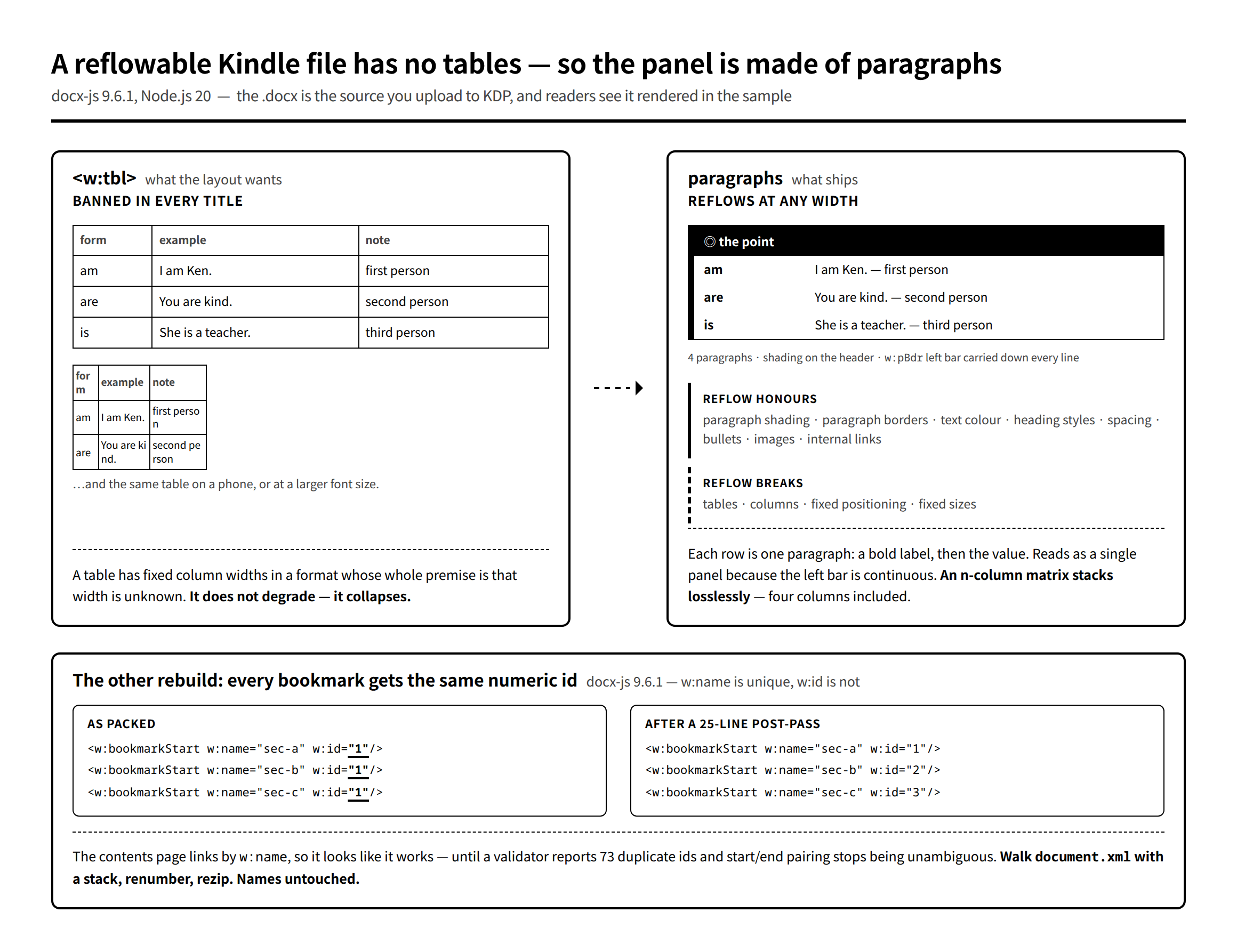
Every bookmark gets w:id="1"
The contents page is internal links: a Bookmark at each section heading, an InternalHyperlink pointing at it by name. In docx-js 9.6.1, the names come out unique and the numeric ids do not.
Three bookmarks, three distinct ids requested:
const doc = new Document({ sections: [{ children: ["a", "b", "c"].map(n =>
  new Paragraph({ children: [ new Bookmark({ id: "sec-" + n, children: [ new TextRun(n) ] }) ] })) }] });
What gets packed:
<w:bookmarkStart w:name="sec-a" w:id="1"/><w:bookmarkEnd w:id="1"/>
<w:bookmarkStart w:name="sec-b" w:id="1"/><w:bookmarkEnd w:id="1"/>
<w:bookmarkStart w:name="sec-c" w:id="1"/><w:bookmarkEnd w:id="1"/>
w:name is what hyperlinks resolve against, so the contents page appears to work when you click through it in Word. That is exactly why this survives review. What it actually produces is a document where every bookmark range shares one id, so start/end pairing is no longer unambiguous, and a validator reports one duplicate-id warning per section — seventy-three of them in the book we found it in.
The fix is a post-pass, because it is easier to renumber XML than to fight a packer. A .docx is a zip; walk document.xml, match every bookmarkStart and bookmarkEnd, and renumber with a stack:
xml = data["word/document.xml"].decode("utf-8")
out, pos, stack, cnt = [], 0, [], 0
for m in re.finditer(r"<w:bookmark(Start|End)[^>]*/>", xml):
    out.append(xml[pos:m.start()])
    tag, kind = m.group(0), m.group(1)
    if kind == "Start":
        cnt += 1
        myid = cnt
        stack.append(myid)
    else:
        myid = stack.pop() if stack else cnt
    out.append(re.sub(r'w:id="\d+"', 'w:id="%d"' % myid, tag))
    pos = m.end()
Then rezip. w:name is untouched, so nothing that referenced a bookmark needs to change — which is the property that makes this safe to bolt onto the end of the build:
execFileSync("python", [fileURLToPath(new URL("renumber-bookmarks.py", DIR)), outPath],
             { stdio: "inherit" });
Twenty-five lines, runs on every build, prints how many it renumbered. In the current file that is 73 bookmarks, 73 distinct ids.
Advertisement
No tables. Anywhere.
The second one is a constraint rather than a bug, and it is the one that shapes the whole generator.
A reflowable Kindle file cannot have a table. Not "avoid large tables" — none. Column widths are fixed at authoring time in a format whose entire premise is that the reading width is unknown: the reader changes the font size, rotates the phone, and the table does not degrade, it collapses. Cells break mid-word, or the whole thing scrolls sideways off the screen.
Our books are full of comparison layouts, so this is not a small restriction. The rule is: grep -c '<w:tbl>' word/document.xml must return 0, checked mechanically after every build.
What we ship instead is a stack of paragraphs that reads as a panel. One paragraph per row: a bold label run, then the value. Shading on the header paragraph, and a left border repeated on every paragraph in the group so the eye joins them into a single box:
const leftBar = { style: BorderStyle.SINGLE, size: 18, color: C.kimo, space: 8 };
// 緑ヘッダー帯(ヒーロー): 塗りは見出しだけ。本文は地色なしで軽く。
out.push(new Paragraph({
  shading: { type: ShadingType.CLEAR, color: "auto", fill: C.kimo },
  border: { top: { style: BorderStyle.SINGLE, size: 18, color: C.kimo, space: 4 },
            left: leftBar,
            right: { style: BorderStyle.SINGLE, size: 4, color: C.kimo, space: 4 } },
  children: [T("◎ ここがキモ", { bold: true, size: S_LAB, color: C.white, font: F_HEAD })],
}));
Rows follow with the same leftBar, a thin right border, and a bottom border on the last one only. Four paragraphs, no table, and it survives any reading width — the label wraps above the value instead of the layout breaking. An n-column matrix stacks losslessly this way; four columns included.
Write new generators this way from the start. Retrofitting is the expensive path, and the temptation to reach for a table is strongest in exactly the place where it hurts most — a review copy, where "a table is easier to read" is true and irrelevant, because the review copy is the Kindle source.
Don’t strip it to plain text either
The other half of that rule, which is easy to get backwards: KDP shows readers the actual rendering of your Word file in the Look Inside sample. They decide whether to buy from it. A file stripped down to safe plain paragraphs looks like what it is.
So the goal is not "remove formatting", it is "remove the formatting that reflow breaks and keep everything else":
- Reflow honours paragraph shading, paragraph borders, text colour, heading styles, spacing, bullets, images, internal links.
- Reflow breaks tables, columns, fixed positioning, fixed sizes.
That first list is enough to design with. And the ebook can be more designed than the paperback, because colour costs nothing here — our print interiors are monochrome for cost reasons and the Kindle edition of the same book carries the full palette. We keep the hex values identical to the CSS variables the print layout uses, so both editions read as the same book.
Two smaller things in the same vein. Set Japanese and Latin fonts separately — w:rFonts has eastAsia alongside ascii/hAnsi, and letting one font cover both is how you get Latin text set in a Japanese face. And place images at the full text width, computed from the page width minus margins, rather than at some fixed inch value that will be too narrow on half of devices:
// 本文幅いっぱい(約516px = ページ内寸)に。縦長は高さ上限で制御。
const MAXW = 516, MAXH = 700;
Verifying it
Two checks, because they catch different things:
- Content coverage — diff the source JSON against the text extracted from the packed
.docx. Catches anything the generator silently dropped. - Convert and look — LibreOffice to PDF, then read it. Catches everything the first check cannot see, which is most of what matters: a shading colour that reads as muddy, a heading that lost its air, a panel whose left bar broke across a page.
Plus the one-line mechanical guards: zero <w:tbl>, and unique bookmark ids.
Neither the duplicate ids nor the table rule showed up as a failure at build time. One needed a validator, one needed someone to ask "wait, this is for Kindle — are tables okay?" Everything in this post exists because the answer was no.
Next: illustrating a textbook with gpt-image-1 — holding one line style across a hundred images, keeping text out of the picture, and why the illustrations are the last thing we make rather than the first.